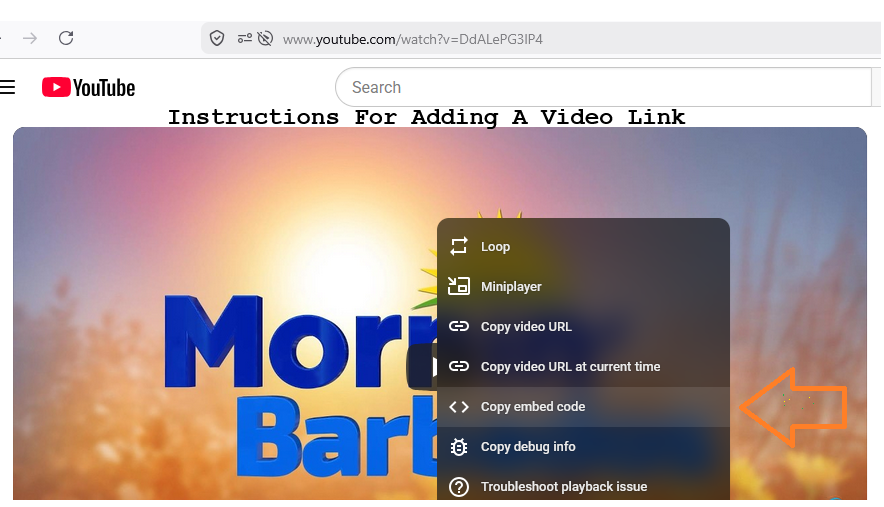
If you want to add a video in the text box, just select the URL of the video, and start to play it. Whilst playing, right click on the screen and a list on a black background sub-section of the screen will appear. Click on the "Copy embed code" line and copy the text to memory.
Then put the cursor in the text box area where you are composing the message and press CTRL-V to paste it in. You may see a few red lines appearing under the characters to suggest that something is wrong. Ignore that. The embedded code would normally start with [FRAME] and end with [FRAME].As long as you see these two words/phrases you are good to go. Just click the SEND icon at the bottom of the message box to deliver your message/content.
You can even just opt to copy the video url directly from the address bar, or right click and use the copy video url option. When you are finished, just click in the conversation box and press CTRL-V, and paste in the address. Then click on the SEND arrow.
I would add here also, that any person wishing to share information other than what they type in the text box must provide the said information via a link to an existing source on the web. No uploading of content will be allowed on this platform from personal sources.
You would also observe that at the bottom of the screen there are three buttons placed next to each other labelled [Video] [Image] [PDF File]. These buttons, represent the interface for the user to access stored URLs for sites that are normally used as source information for the user to pass on.
When any of the buttons are clicked, the user will be transported to an active listing of options representing what the user wishes to use. The user just has to click the required option from the list and that will trigger the adding of the selected data to the conversation pool, and will be automatically inserted. The results will appear in the conversation list.
Please note that the feature is not yet active, but this programmer has provided a sample for each file type to represent what the user ought to see under live conditions. So feel free to click it during any text messaging session and you will see the results.